Jio 5G for Work From Home Speed, Setup & Best Plans
Remote work has become a major part of modern life. Many professionals now rely on strong internet to join video meetings, upload large files, and stay productive. When it comes to remote work, having the right connection can make all the difference. In India one of the fastest growing technologies for home internet is Jio 5G. In this guide you will learn everything about Jio 5G for work from home including speed, setup steps and the best plans available.
Table of Contents
- What is Jio 5G
- Why Jio 5G is Important for Remote Work
- Expected Speed and Performance
- How to Set Up Jio 5G at Home
- Best Jio 5G Plans for Work From Home
- Comparison Table of Plans
- Tips to Improve Remote Work Experience
- Common Issues and Solutions
- FAQs
- Final Thoughts
What is Jio 5G
Jio 5G is the next generation mobile network technology offered by Reliance Jio. It is designed to deliver faster speeds and lower latency compared to older 4G services. For people working from home, Jio 5G offers a stable and efficient connection that supports high definition video calls, cloud based work tools and multiple users on the same network.
Understanding Jio 5G for work from home is essential for anyone planning to depend on internet at home for professional tasks. Traditional home broadband may not always be available or reliable in many areas. In these situations Jio 5G becomes a strong alternative.
Why Jio 5G is Important for Remote Work
Remote work often includes tasks such as video conferencing, large file transfers and online collaboration. These tasks depend not only on speed but also on the consistency of the connection. Jio 5G aims to provide a connection that is both fast and stable.
The main reasons why people are choosing Jio 5G for work from home include speed, mobility and easy setup. Unlike broadband internet, 5G does not require long installation times. Once you have the right hardware you can start using it right away.

Speed and Latency
One of the biggest advantages of Jio 5G is speed. In many areas users can experience download speeds that are significantly higher than 4G. Additionally latency is lower which means faster response times during video calls and real time online activities.
Mobility
With Jio 5G you are not tied to one location. You can use the internet anywhere within the coverage area. For remote workers who split time between locations this flexibility can be highly useful.
Easy Setup
Setting up a 5G connection is usually faster than setting up traditional fiber internet. For people who need internet quickly at home, Jio 5G for work from home provides a reliable solution that does not require long wait times for installation.
Expected Speed and Performance
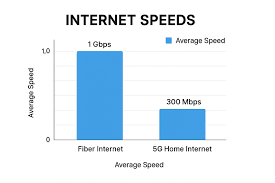
Speed is one of the most important factors when evaluating internet options. Jio 5G speed can vary depending on your location, signal strength and network traffic. However in many tests residential users have reported download speeds that exceed 100 Mbps. When compared with many basic fixed broadband connections, this can result in smoother video meetings and faster downloads.
It is important to note that real world performance may differ from theoretical maximum speeds. Factors such as distance from 5G tower, number of simultaneous users and network congestion can affect the experience. Always check local performance reviews before relying entirely on 5G for work.
How to Set Up Jio 5G at Home
Setting up Jio 5G for work from home is straightforward. There are few key steps you need to follow to get started.
Step 1 Choose the Right 5G Plan
Select a Jio 5G plan that offers enough data and speed for your work. It is important to evaluate your needs such as video meetings, cloud uploads and downloads before choosing a plan.
Step 2 Get a Compatible Device
You need a 5G capable device or home router that supports 5G. Many modern smartphones and routers now come with this capability. Make sure the device supports the bands available in your area.
Step 3 Activate SIM or Router
Insert your Jio 5G SIM into the device or router and follow the activation steps provided by Jio. Usually this involves entering activation codes or following instructions on the MyJio app.
Step 4 Optimize Your Setup
Placement of your 5G router or device can influence speed. Place the device in a location where signal strength is high and where it can serve all users in your home.
Best Jio 5G Plans for Work From Home
The right plan will depend on how much data you use and how many devices you connect. Below are some of the top Jio 5G plans that users have found suitable for remote work:
Plan A High Data Plan
- High daily data allowance
- Unlimited voice calls
- Priority customer support
Plan B Moderate Data Plan
- Moderate data with fair usage policies
- Unlimited calls and SMS
- Good for most remote work tasks
Plan C Basic Plan
- Affordable option for casual use
- Suitable for email, messaging, light video calls
Actual names and pricing of plans will vary based on region and offers at the time of purchase. Check the official Jio plans page to find current details and promotions.
Comparison Table of Plans
| Plan Name | Data Allowance | Voice Calls | Best For |
|---|---|---|---|
| Plan A | High | Unlimited | Power Users |
| Plan B | Moderate | Unlimited | Daily Remote Work |
| Plan C | Basic | Unlimited | Light Users |
Tips to Improve Remote Work Experience
Use a Home Router
If you plan to connect multiple devices consider using a dedicated 5G home router. This can improve range and signal stability compared with using a smartphone as a hotspot.
Place Your Router Near a Window
Signal strength matters for performance. Placing the router near windows or in open areas can improve connectivity.
Monitor Data Usage
Make sure your chosen plan offers enough data for your monthly needs. Remote work often involves video calls and cloud uploads which can consume data quickly.
Common Issues and Solutions
Slow Speed
If you notice slower than expected performance check signal strength and move the device to a better location. Also consider upgrading your plan.
Connection Drops
Connection drops can occur when signal fluctuates. In such cases a home router with external antenna may help.
Too Many Devices
Connecting too many devices at once can spread bandwidth thin. Limit connections to essential devices when working.
FAQs
What is the average speed of Jio 5G for work from home?
Speed varies by location but many users report over 100 Mbps which is suitable for most professional tasks.
Is Jio 5G reliable for remote work?
Yes, many users find Jio 5G reliable for video conferencing and files uploads but performance may depend on signal quality.
Do I need special device for Jio 5G?
Yes, you need a 5G capable device or router to use Jio 5G for work from home.
Can I use Jio 5G instead of fiber broadband?
Yes, many professionals use 5G as their primary home internet especially if fiber is not available.
Where can I find current Jio 5G plans?
Visit the official Jio website or the MyJio app to view the latest plans.
Final Thoughts
Choosing Jio 5G for work from home can be a smart decision if you want flexibility, high speed and fast setup. With the right device and plan you can enjoy a stable connection suitable for video calls, large file uploads and daily communications. Always check local performance and plan details before committing to a long term subscription.



Leave a Reply